Multimedia
Multimedia uses more than one type of media to display information — such as a video with sound and text.
Captions

Multimedia must include captions — or text versions of speech and other important audio content. This makes it accessible to people who can’t hear all of the audio. All multimedia with speech should have captions that are:
- Synchronized to appear at approximately the same time as the corresponding audio.
- Equivalent to the spoken words and other audio information.
- Available to those who need it.
Automatically generated captions are not good enough. Most platforms will now auto-caption content and allow you to edit where machines get it wrong.
Transcripts
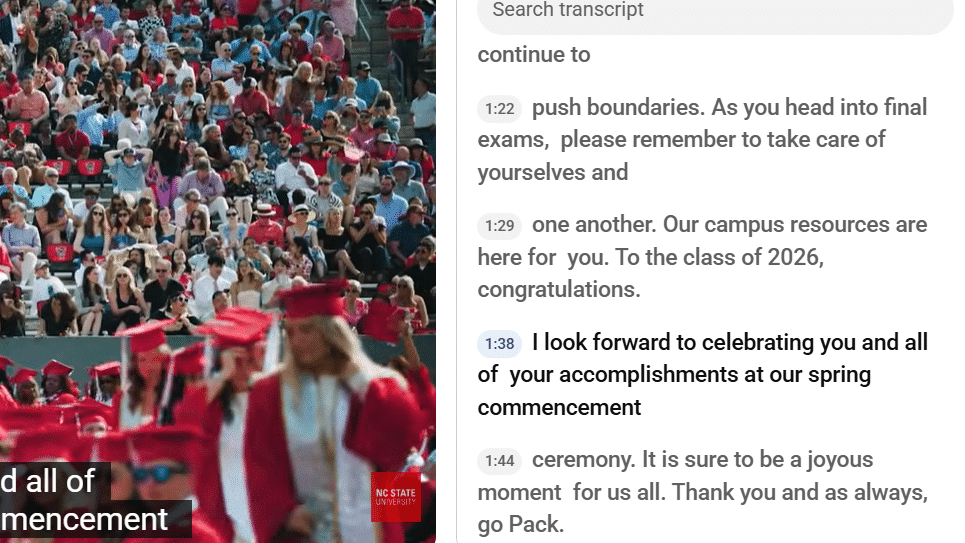
A transcript can help individuals who cannot hear or see multimedia. Transcripts should include:
- All spoken words
- Descriptions of important audio information (like laughter)
- Descriptions of important visual information (such as someone entering the room)
Audio Descriptions
Audio descriptions help individuals with visual disabilities perceive visual-only content. They can be provided with the primary video, in another audio track or through a second version of the video that includes audio descriptions.
- Audio descriptions are not needed if the audio already presents the necessary visual content.
- If a video displays a list of five important items, each item should be read aloud instead of the audio only presenting, “As you can see, there are five important points.”
- Instead of “Click here and then here,” the presenter should describe what is being clicked. This way, no separate audio description track is necessary.
Consider the multimedia files you are creating. Can you close your eyes and understand the meaning and purpose? If not, you may need to write an audio description for your content.